
Download Dojoclip – AI‑Powered Video Editing Tool for Fast, Free, Secure Edits
Overview
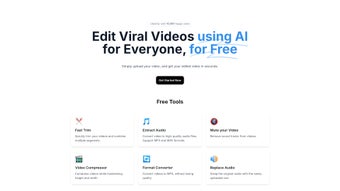
Dojoclip is an innovative, web‑based video editing platform that puts artificial intelligence at the heart of the editing workflow. Designed for creators, marketers, and social‑media enthusiasts, Dojoclip lets you upload a raw clip, type a simple instruction, and receive a polished, subtitle‑ready video in minutes. The AI engine analyses your footage, understands the context of your command, and automatically performs cuts, transitions, color corrections, and subtitle generation without the need for manual keyframing or timeline juggling. Because the service runs entirely in the browser, there’s no software download, no hefty system requirements, and you can work from any device—whether you’re on Windows, macOS, Android, or iOS. The platform is offered free of charge, making professional‑grade video production accessible to anyone with an internet connection. Dojoclip’s growing community of creators highlights its effectiveness: users report higher engagement rates on TikTok, Instagram Reels, and YouTube Shorts after switching to the AI workflow. Understanding how the AI interprets your prompts is essential to getting the best results, and the Dojoclip website provides a detailed guide and examples to help you master the tool quickly.
Key Features That Set Dojoclip Apart
- AI‑Driven Editing Commands: Type natural‑language instructions (e.g., “trim the intro to 5 seconds” or “add upbeat music”) and let the AI execute them instantly.
- Automatic Subtitle Generation: The system transcribes spoken words, creates accurate captions, and syncs them to the video timeline in over 30 languages.
- One‑Click Export for Social Platforms: Export directly to formats optimized for TikTok, Instagram Reels, YouTube Shorts, or standard MP4 for broader use.
- Cloud‑Based Processing: All rendering occurs on Dojoclip’s secure servers, freeing up local CPU/GPU resources and guaranteeing fast turnaround times.
- Free Tier with No Watermark: Unlike many AI editors, Dojoclip’s free plan provides full‑resolution exports without branding.
- Template Library: Choose from pre‑built video templates for promos, tutorials, and product demos that can be customized with your footage.
- Secure Data Handling: Uploaded videos are encrypted in transit and automatically deleted after 48 hours, ensuring privacy.
- Cross‑Platform Accessibility: Works on any modern browser, making it usable on Windows, macOS, Linux, Android, and iOS devices.
Each feature is built around the core promise of Dojoclip: to eliminate tedious, manual steps and let creators focus on storytelling. The AI’s ability to understand context means you can give higher‑level directions—like “highlight the product’s key features with zooms”—and the system will intelligently add motion effects where appropriate. The subtitle engine leverages speech‑to‑text models that achieve over 95 % accuracy on clear audio, drastically reducing the time spent on manual captioning. Moreover, the export presets automatically adjust aspect ratios and bitrate to meet each platform’s specifications, helping you avoid the common pitfalls of rejected uploads. The free tier’s lack of watermarks is a game‑changer for small businesses and influencers who need a professional look without a recurring subscription fee.
Installation & Usage – How to Get Started in Minutes
Because Dojoclip is a web‑based service, there is no traditional installation process. Simply navigate to dojoclip.com using a modern browser such as Chrome, Firefox, Edge, or Safari. The site automatically detects your device and loads a lightweight interface that runs entirely in the browser’s sandbox. Here’s a step‑by‑step guide to start editing:
- Create a free account: Click “Sign Up,” enter your email, and confirm the verification link. The registration takes less than a minute.
- Upload your video: Drag‑and‑drop a file (up to 1 GB on the free tier) or select it from your device storage. Supported formats include MP4, MOV, AVI, and WebM.
- Enter your edit instruction: In the command box, type a plain‑English request such as “cut the first 3 seconds, add a fade‑in, and overlay upbeat music at 0:05.”
- Choose optional settings: Enable subtitles, select a language, or pick a template for visual overlays.
- Process the edit: Click “Generate.” The AI begins processing on Dojoclip’s cloud servers; most edits complete within 30–60 seconds, depending on video length.
- Preview and fine‑tune: A preview window lets you scrub through the result. If you need adjustments, add another command (“increase the volume of the background music”) and re‑run the AI.
- Export your final video: Choose an export preset (TikTok, Instagram Reels, YouTube Shorts, or Custom MP4) and click “Download.” The file saves directly to your device.
The entire workflow is designed for speed and simplicity, allowing you to produce high‑quality content without learning a complex timeline editor. For power users, Dojoclip also provides an API key (available on the paid plan) that lets you integrate the AI editing engine into your own applications or automate bulk video processing.
Compatibility – Works Anywhere You Have a Browser
Dojoclip’s cloud architecture means you are not limited by local hardware. As long as you have a stable internet connection and a browser that supports WebGL and modern JavaScript (Chrome 80+, Firefox 75+, Safari 13+, Edge 80+), the platform will run smoothly. This cross‑platform nature makes it ideal for creators who switch between a desktop workstation, a laptop on a coffee shop, or a mobile phone while traveling. The service also complies with major accessibility standards, offering keyboard navigation and screen‑reader friendly controls.
Pros and Cons – A Balanced Look at Dojoclip
Pros
- Instant AI editing eliminates manual cutting and keyframing.
- Free tier offers full‑resolution exports with no watermarks.
- Automatic multilingual subtitles boost accessibility and SEO.
- One‑click export presets save time and guarantee platform compliance.
- Secure cloud processing protects your footage and privacy.
- Cross‑platform availability – works on Windows, macOS, Linux, Android, iOS.
- Intuitive natural‑language command interface lowers the learning curve.
Cons
- Processing speed depends on internet bandwidth and server load.
- Advanced customizations (e.g., precise keyframe control) are limited in the free version.
- No offline mode – you must be online to edit or export.
- Maximum file size (1 GB) may be restrictive for high‑resolution projects.
- API access and higher‑resolution exports require a paid subscription.
Overall, Dojoclip excels at delivering fast, high‑quality edits for creators who value speed and convenience over deep manual control. The pros heavily outweigh the cons for most social‑media marketers, educators, and small business owners. Even the limitations—such as the reliance on an internet connection—are typical for cloud‑based SaaS tools and are offset by the massive time savings the AI provides.
Frequently Asked Questions
Is Dojoclip really free, and are there hidden costs?
Yes, Dojoclip offers a completely free tier that includes unlimited edits, full‑resolution exports, and no watermarks. The only costs arise if you opt for the premium plan, which adds features like larger file size limits, API access, and priority rendering.
How secure is my video data on Dojoclip’s servers?
All uploads are encrypted using TLS 1.3 during transfer, and files are stored in encrypted containers on the server. Dojoclip automatically deletes your footage after 48 hours, ensuring that no personal media remains on the platform longer than necessary.
Can I edit videos on my mobile device?
Absolutely. Since Dojoclip runs in the browser, you can access it from any smartphone or tablet with a modern browser. The interface adapts to smaller screens, allowing you to upload, command, and download videos directly from Android or iOS devices.
What video formats does Dojoclip support?
Dojoclip accepts MP4, MOV, AVI, and WebM files. For best results, we recommend using MP4 with H.264 encoding, as it offers a good balance of quality and processing speed.
How accurate are the automatically generated subtitles?
The subtitle engine leverages state‑of‑the‑art speech‑to‑text models that achieve around 95 % accuracy on clear audio. You can manually edit any caption within the preview window if you need to fine‑tune phrasing or timing.
Conclusion – Why You Should Download Dojoclip Today
If you’re looking for a fast, reliable, and free solution to turn raw footage into polished, subtitle‑ready videos, Dojoclip stands out as a top choice. Its AI‑driven workflow eliminates the steep learning curve of traditional editors, while the cloud‑based infrastructure guarantees that you can work from any device without worrying about hardware limitations. The platform’s emphasis on security, multilingual subtitles, and direct export to social platforms makes it especially valuable for marketers, educators, and influencers aiming to boost engagement quickly. By embracing Dojoclip, you’ll shave hours off your editing schedule, free up creative energy for content strategy, and produce videos that look professional without paying a premium price. Ready to experience effortless video editing? Visit dojoclip.com, sign up for free, and start creating viral‑ready videos in minutes.



.png)



